Mastering the Real Estate Web Banner
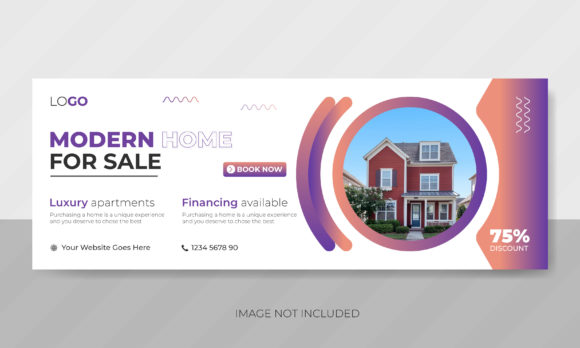
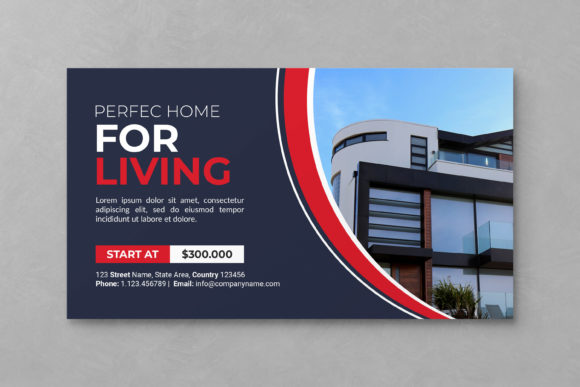
In the fast-paced world of property sales, first impressions are not just important; they are everything. A Real Estate Web Banner serves as the digital handshake between a listing agent and a potential buyer. It is often the very first visual element a user encounters when browsing property portals, social media feeds, or agency websites. Unlike static print flyers, these digital assets must capture attention instantly, convey key information clearly, and compel the viewer to click through for more details. For real estate professionals, marketers, and designers, understanding how to leverage a high-quality, editable banner template can significantly streamline workflow and enhance conversion rates.
Why Visual Structure Matters in Property Marketing
The primary purpose of a well-designed web banner is to communicate value without overwhelming the viewer. In real estate, this means highlighting the property’s best features—such as a modern kitchen, a spacious backyard, or a prime location—while maintaining a clean, professional aesthetic. A cluttered design can distract from the message, causing potential leads to scroll past. This is where a structured template becomes invaluable. By using a pre-organized layout, you ensure that text, images, and calls to action are balanced correctly, adhering to principles of visual hierarchy that guide the eye naturally across the content.
For beginners and seasoned professionals alike, the appeal of a ready-made solution lies in its reliability. You do not need to start from scratch every time a new listing comes on the market. Instead, you can focus on selecting the right photography and crafting compelling copy, knowing that the underlying design structure is already optimized for web standards. This efficiency allows agents to respond quickly to market changes, posting new listings faster than competitors who may be bogged down by complex design processes.
Key Features of an Editable PSD Template
When selecting a design resource, flexibility is paramount. A high-quality Real Estate Web Banner template should offer complete control over every visual element. The most effective templates are delivered in PSD (Photoshop Document) format, which preserves layers and editing capabilities. Here is what makes a truly useful template stand out:
- Smart Objects for Images: This is perhaps the most critical feature for non-designers. Smart Objects allow you to drag and drop your property photos into predefined containers. The image automatically resizes and fits within the frame without distorting or breaking the layout. This eliminates the guesswork of cropping and scaling, ensuring a polished look every time.
- Organized Layer Groups: A messy file can turn a quick edit into a hours-long frustration. A well-structured template groups layers logically—for example, separating text, background, icons, and images into distinct folders. Each layer is named clearly, so you can find exactly what you need to change without hunting through hundreds of unnamed items.
- Free Fonts and Typography: Licensing issues can halt a project in its tracks. Templates that utilize free, commercially available fonts ensure that your design looks consistent on any computer, even if you do not have expensive typefaces installed. This also makes it easier to maintain brand consistency across different team members.
- Optimized Dimensions: Standard web dimensions, such as 2000x1124 pixels at 72 DPI in RGB color mode, ensure that your banner loads quickly and looks sharp on high-resolution screens. These specifications are ideal for hero sections on websites, Facebook cover photos, and large display ads.
Practical Applications for Agents and Marketers
The versatility of a Real Estate Web Banner extends beyond simple website headers. Entrepreneurs, freelancers, and small business owners can adapt these templates for various digital touchpoints. For instance, a real estate blogger might use the banner to highlight a featured article about market trends, swapping the property photo for a relevant graphic. Similarly, educators teaching digital marketing can use these files to demonstrate how layer management and smart objects function in a real-world context.
Consider a scenario where a local agency is launching a new development. They can use the same template to create a cohesive campaign across multiple platforms. By simply changing the text and image via the smart objects, they can generate a website banner, a social media post, and an email header that all share the same visual identity. This consistency builds trust and recognition among potential buyers. Furthermore, because the colors are fully editable, the banner can be adjusted to match specific branding guidelines or seasonal themes, such as using warmer tones for autumn listings or crisp blues for winter promotions.
Important Considerations Before You Start Editing
While these templates are designed for ease of use, there are a few practical things to keep in mind to ensure the best results. First, it is essential to understand that the preview image you see in the product description is for demonstration purposes only. The actual photos shown in the preview are not included in the main file. You must supply your own high-quality images to achieve the desired effect. Low-resolution photos will look pixelated when scaled up, so always start with the best source material possible.
Second, while the template is not a mockup, it is a functional design file. This means you need basic familiarity with Adobe Photoshop or compatible software. You do not need to be an expert designer, but knowing how to open a PSD file, toggle layer visibility, and export for web is necessary. Most modern versions of Photoshop handle these tasks intuitively, but taking a few minutes to review the layer structure before making changes can save time.
Finally, consider the context in which the banner will be displayed. If it is for a mobile-heavy audience, ensure that the text remains legible on smaller screens. Although the template is 2000x1124 pixels, you may need to create scaled-down versions for different devices. Keeping the core message concise and the font size adequate ensures that your Real Estate Web Banner performs well across all platforms.
Maximizing Value Through Efficient Design
Ultimately, the goal of using a structured template is to reduce friction in your creative process. By leveraging tools like smart objects and organized layers, you transform a potentially tedious task into a quick, repeatable workflow. This allows you to spend less time pushing pixels and more time engaging with clients and closing deals. Whether you are a hobbyist looking to improve your personal blog or a professional marketer managing multiple listings, a well-crafted banner template provides the foundation for successful digital communication.
Remember that design is a tool, not just an aesthetic choice. A clear, professional banner signals credibility and attention to detail—qualities that buyers look for in their agents. By investing in a flexible, easy-to-edit resource, you equip yourself with the ability to present every property in its best light, efficiently and effectively. As you begin to customize your own banners, experiment with different color combinations and text placements to see what resonates best with your audience. The freedom to edit quickly means you can test, learn, and refine your approach without significant overhead, leading to better engagement and stronger results over time.