Tag Label Design: A Practical Guide to Visual Organization and Workflow Efficiency
In an era where digital clutter and information overload are constant challenges, Tag Label Design has emerged as a critical component of effective visual communication. Whether you are managing a complex e-commerce inventory, organizing educational materials, or branding a new product line, the way you label items dictates how quickly and accurately users interact with them. A well-designed tag is not merely decorative; it is a functional tool that bridges the gap between raw data and human understanding.
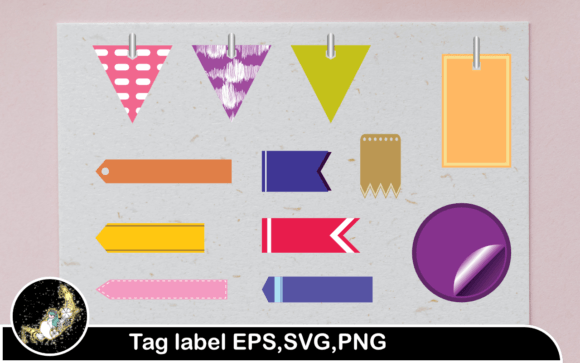
This article explores the practical application of colorful tag labels in professional workflows. We will examine how these assets integrate into broader design systems, discuss the technical benefits of versatile file formats like EPS, SVG, and PNG, and provide actionable strategies for implementing them across various industries.
The Role of Tag Labels in Modern Workflows
At its core, tag label design is about categorization and identification. However, in a professional context, it extends far beyond simple naming. It involves creating a visual hierarchy that guides the eye and simplifies decision-making. When integrated correctly into a project lifecycle, tag labels serve three primary functions:
- Identification: Clearly distinguishing one item from another, such as differentiating between product sizes or software versions.
- Organization: Grouping related items together to create logical structures, whether in a physical warehouse or a digital database.
- Communication: Conveying additional information quickly, such as "New," "Sale," "Organic," or "Priority," without requiring extensive reading.
For entrepreneurs and small business owners, consistent tag design reinforces brand identity. For educators and publishers, it aids in curriculum navigation. For marketers, it highlights key selling points. The versatility of tag labels makes them indispensable across diverse sectors.
Integrating Colorful Tag Labels into Your Design Process
The use of color in tag label design is not arbitrary. Color psychology plays a significant role in how users perceive and react to labels. A colorful tag label can draw attention to urgent tasks, signify status changes, or categorize items by type. However, effective integration requires a strategic approach to ensure consistency and usability.
Pre-Production Planning
Before deploying tags, consider your existing color palette. If your brand uses specific primary colors, your tags should complement rather than clash with them. Plan your color coding system early in the project. For instance, you might decide that red tags indicate high priority, blue tags represent informational content, and green tags signify completion. This pre-planning ensures that when you implement the tags, they align with user expectations and internal workflows.
During Execution and Implementation
When applying tags to products, documents, or digital interfaces, consistency is key. Use the same shape, font size, and placement for similar types of information. This reduces cognitive load for the user. If you are using digital assets, ensure that the tags scale appropriately across different screen sizes or print dimensions. This is where having access to multiple file formats becomes crucial.
Post-Implementation Review
After deploying your tag labels, monitor their effectiveness. Are users noticing the "Sale" tags? Are employees correctly sorting items based on color codes? Gather feedback and be prepared to iterate. You may find that certain colors are hard to distinguish under specific lighting conditions or that certain labels are too cluttered. Adjustments are a natural part of the optimization process.
Technical Assets: Understanding File Formats for Maximum Flexibility
One of the most significant advantages of purchasing or creating a comprehensive tag label design package is the variety of file formats included. A typical high-quality zip file will contain EPS, SVG, and PNG files. Understanding how to leverage each format ensures you get the most out of your design assets.
EPS and SVG: The Power of Vector Graphics
EPS (Encapsulated PostScript) and SVG (Scalable Vector Graphics) files are vector-based. This means they are defined by mathematical paths rather than pixels. The primary benefit of vector files is infinite scalability. You can resize a tag label from the size of a postage stamp to a billboard without any loss in quality. There will be no pixelation or blurring.
These formats are ideal for:
- Print Production: When sending designs to professional printers for packaging, brochures, or large-format signage.
- Customization: Vector files can be easily edited in software like Adobe Illustrator or CorelDRAW. You can change colors, adjust shapes, or modify text to fit specific needs.
- Web Development: SVGs are particularly useful for websites because they are lightweight and render sharply on all devices, including high-resolution Retina displays.
PNG: Ready-to-Use Raster Images
The inclusion of 20 PNG files at 300dpi with translucent backgrounds offers immediate usability. PNG is a raster format, meaning it is made of pixels. However, at 300 dots per inch (dpi), these images are high-resolution enough for most standard printing needs and digital displays.
The translucent background is a critical feature. It allows you to place the tag label over any background color or image without a white box appearing around it. This makes PNGs perfect for:
- Quick Digital Mockups: Dragging and dropping tags onto product photos for e-commerce listings.
- Social Media Graphics: Adding promotional tags to Instagram or Facebook posts without needing advanced design skills.
- Presentation Decks: Enhancing slides with visual cues that blend seamlessly into the slide background.
Practical Implementation Tips for Various Industries
To maximize the value of your tag label design assets, consider these industry-specific applications:
E-Commerce and Retail
Use colorful tags to highlight promotions. A "Best Seller" or "Limited Edition" tag can significantly increase click-through rates. Ensure that the tag does not obscure essential product details. Use the PNG files for quick updates during flash sales, and the SVG files for permanent website elements that need to remain crisp on all devices.
Education and Publishing
Educators can use tags to organize lesson plans, worksheets, or digital resources. Color-code tags by subject, grade level, or difficulty. Publishers can use tags on book covers or inside layouts to denote series information or special editions. The consistency provided by vector files ensures that printed materials look professional and cohesive.
Project Management and Productivity
Freelancers and teams can use digital tags in project management tools like Trello, Asana, or Notion. While these platforms have built-in labeling, custom-designed tags can be used in documentation, reports, and client presentations to maintain brand consistency. Use the EPS files to create custom icons or badges for internal dashboards.
Ensuring Quality and Consistency
When integrating tag labels into your workflow, pay attention to quality control. Always check the contrast between the tag color and the background it sits on. Poor contrast can make text unreadable. Additionally, maintain a consistent style guide. If your tags have rounded corners, keep them rounded throughout your project. If they use a specific font, stick to it.
Long-term use of these assets requires organization. Store your EPS, SVG, and PNG files in a structured folder system. Label them clearly so that team members can easily find the right asset for the right task. This reduces time wasted searching for files and ensures that everyone is using the most up-to-date versions.
Conclusion
Tag Label Design is more than an aesthetic choice; it is a functional necessity in organized workflows. By leveraging colorful tag labels, professionals can enhance clarity, improve efficiency, and strengthen brand identity. The availability of versatile file formats like EPS, SVG, and high-resolution PNGs ensures that these designs can be adapted to any medium, from digital screens to printed packaging. By planning carefully, implementing consistently, and reviewing regularly, you can transform simple labels into powerful tools for communication and organization.